5 Week 4: Subqueries and Views
In this lecture, we will explore subqueries and views in SQL. These concepts help us break complicated queries into smaller, more manageable parts, improving our ability to read and maintain our code.
5.1 Connecting to our database
As always, to access the data, we create our database connection to our data.
With our data loaded and ready to go, let’s get started!
5.2 Some reading about temp tables, subqueries, and views
From above:
If you’re looking to handle dynamic data filtering and retrieval within a single query, Subqueries offer a straightforward approach despite potential readability challenges.
When tackling multi-pass processing or iterative data manipulation across multiple sessions, the persistent nature of Temporary Tables proves invaluable.
Finally, for abstracting complex data structures into easily accessible and consistently used components across your database, Views stand as an enduring solution, promoting readability and data consistency over the long term.
5.3 Subqueries
A subquery is a query nested inside another query. Subqueries let us process smaller computations inside larger outer queries.
If we look at this very generic statement of all the queries we learned so far:
SELECT c2, SUM(c3)
FROM d1
WHERE c1 IN (a1, a2, a3, a4)
INNER JOIN d2
BY d1.c2 = d2.c2
GROUP BY c2
HAVING SUM(c3) IN (z1, z2)
Where is it possible to substitute a Subquery? Subquries can be organized by their outputs:
Single-value Subquery
Single-column Subquery
Multi-column Subquery
We’re just going to focus on Single-column Subqueries for today.
5.3.1 Using a Subquery in the SELECT Clause
Let’s use a subquery to dynamically calculate the age of each individual (as of November 7th, 2025) in our database while collecting other patient demographic data. To handle this, we’ll make use of the person table in our dataframe and the birth_datetime column.
SELECT
  person_id,
  birth_datetime,
  gender_source_value,
  race_source_value,
  ethnicity_source_value,
  (SELECT
    DATE_DIFF('year', birth_datetime, DATE '2024-03-07')
  ) AS age
FROM person
LIMIT 10| person_id | birth_datetime | gender_source_value | race_source_value | ethnicity_source_value | age |
|---|---|---|---|---|---|
| 6 | 1963-12-31 | F | black | west_indian | 61 |
| 123 | 1950-04-12 | M | white | italian | 74 |
| 129 | 1974-10-07 | M | white | polish | 50 |
| 16 | 1971-10-13 | F | white | american | 53 |
| 65 | 1967-03-31 | F | black | dominican | 57 |
| 74 | 1972-01-05 | F | white | english | 52 |
| 42 | 1909-11-02 | F | white | irish | 115 |
| 187 | 1945-07-23 | M | white | irish | 79 |
| 18 | 1965-11-17 | F | white | english | 59 |
| 111 | 1975-05-02 | F | white | english | 49 |
As we can see in the above example, we’ve performed the computation of calculating patient age in a subquery:
SELECT
DATE_DIFF('year', birth_datetime, DATE '2024-03-07')
This subquery is integrated into the larger query of collecting patient data, and doesn’t need to refer to the person table. Any variable referenced in the larger outer query can be accessed in the inner subquery.
5.3.1.1 Using DATEDIFF to compare dates
The DATEDIFF function in SQL can be used to calculate differences between days. DATEDIFF takes three parameters: the unit of time, a first date, and a second date. For instance, calling:
SELECT DATEDIFF('month', DATE '2020-01-01', DATE '2025-11-07')calculates the number of months between January 1st, 2020, and November 11th, 2025. All three parameters are required. You can refer to the documentation for DATEDIFF here to see other options for time intervals.
5.3.1.2 Check on learning
Fill in the blank in the query below to dynamically calculate the number of days between the condition start date and condition end date for all conditions from the condition_occurrence table
SELECT
  person_id,
  visit_occurrence_id,
  condition_occurrence_id,
  condition_concept_id,
  condition_start_date,
  condition_end_date,
  (SELECT
    DATE_DIFF(_____, _____, _____)
  ) AS condition_time_span
FROM condition_occurrence
LIMIT 10
5.3.2 Filtering with a Subquery
We’ve now worked through a couple of examples where we use subqueries to create new variables within our SELECT clause. Another type of query we can tackle is the filtration of data based on conditions calculated in a subquery.
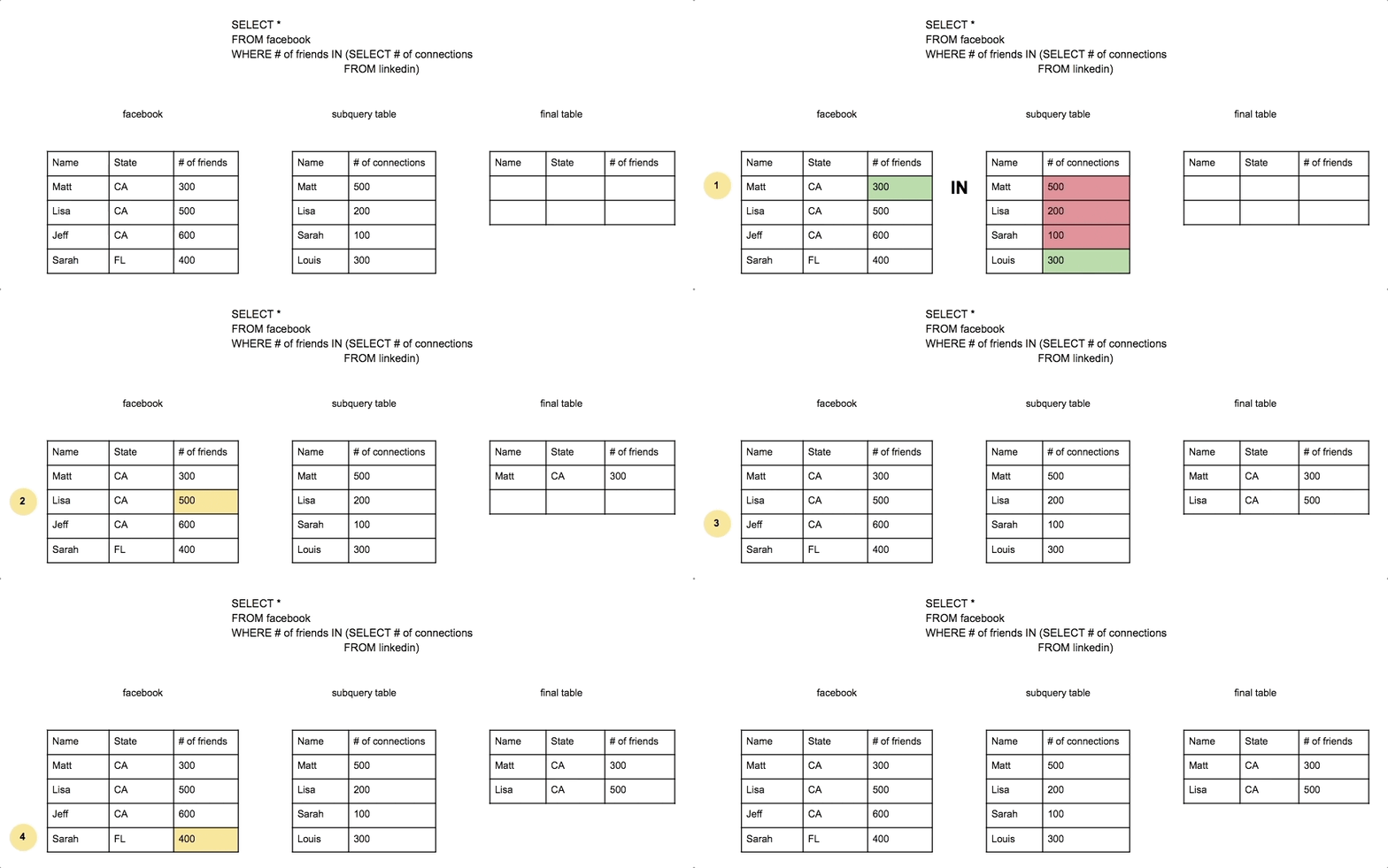
Here’s a great example from The Data School, where we apply a subquery in the filtration component of our larger query to find individuals on Facebook who have the same number of Facebook connections as anyone else on LinkedIn.
5.3.2.1 A brief review: the IN clause
The IN clause in SQL is used to filter records where a column matches any value in a specified list or subquery result. It is a shorthand for multiple OR conditions and is commonly used for readability and efficiency.
For instance, the basic syntax of:
SELECT column_name
FROM table_name
WHERE column_name IN (value1, value2, value3);
is equivalent to:
SELECT column_name
FROM table_name
WHERE column_name = value1
   OR column_name = value2
   OR column_name = value3;
Now back to using a subquery for filtering!
For our own database, let’s collect patient demographic data for all patients who had some kind of procedure performed after December 31st, 2018. We’ll make use of the person and procedure_occurrence tables for this query.
We can start by writing the computation for our subquery - collection patient IDs for individuals who had a procedure after December 31st, 2018.
SELECT
  person_id
FROM
  procedure_occurrence
WHERE
procedure_datetime >= DATE '2019-01-01';| person_id |
|---|
| 636 |
| 1072 |
| 1084 |
| 1072 |
| 967 |
| 823 |
| 823 |
| 972 |
| 703 |
| 299 |
Now, we can insert this query into the WHERE clause of our larger query that collects patient demographic information!
SELECT
  person_id,
  birth_datetime,
  gender_source_value,
  race_source_value,
  ethnicity_source_value
FROM
  person
WHERE
  person_id IN (
    SELECT
      person_id
    FROM
      procedure_occurrence
    WHERE
      procedure_datetime >= DATE '2019-01-01'
);| person_id | birth_datetime | gender_source_value | race_source_value | ethnicity_source_value |
|---|---|---|---|---|
| 160 | 1961-07-27 | F | hispanic | puerto_rican |
| 99 | 1958-10-25 | F | black | west_indian |
| 36 | 1958-10-21 | F | white | german |
| 286 | 1928-05-05 | F | white | american |
| 299 | 1961-12-09 | F | white | german |
| 403 | 1922-02-27 | M | white | polish |
| 280 | 1938-10-28 | F | hispanic | central_american |
| 307 | 1969-06-21 | M | white | russian |
| 636 | 1948-03-12 | M | white | irish |
| 354 | 1956-01-05 | F | white | irish |
5.3.2.2 Check on learning
Write out a query to collection patient IDs for individuals who had at least two procedures. This query will become the subquery in our larger computation.
SELECT person_id, COUNT(person_id) AS person_id_count
FROM procedure_occurrence
GROUP BY ---
HAVING --- >= 2
For our subquery, we only need person_id as our final column, and not person_id_count. Move the COUNT(person_id) statement into the HAVING clause:
SELECT person_id
FROM procedure_occurrence
GROUP BY ---
HAVING --- >= 2
Now, fill in the blank in the following SQL query with the subquery that you just developed to collect patient demographic data for any patient that had at least two procedures:
SELECT
  person_id,
  birth_datetime,
  gender_source_value,
  race_source_value,
  ethnicity_source_value
FROM
  person
WHERE
  person_id IN (_________);
5.3.3 When to use subqueries
Subqueries are powerful because they allow you to break down complex queries into smaller, more manageable parts. You should use subqueries when:
You need to use a computed value in a query: See our previous examples!
You want to avoid duplicating code: Instead of repeating a calculation, you can use a subquery to define it a single time and reuse it (i.e.
age).You want to avoid performing unnecessary
JOIN’s: Subqueries let you filter results row-by-row based on information from another table without requiring aJOIN.You need to improve your code’s readability: Subqueries help make queries more modular and easier to debug. Conceptually, it can be easier to create a multi-step query and check intermediate phases than do perform a bunch of
JOIN’s.
Can you think of any examples where it might be better to use a JOIN over a subquery?
5.4 Views
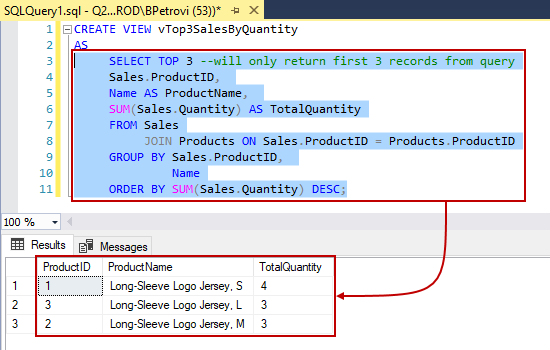
A view is a stored SQL query that acts as a virtual table. Views improve code reuse and readability. The following image, taken from SQLShack, depicts how a complicated query can be turned into a customized view that can be used in downstream data processing.
5.4.1 When to use views
Similar to subqueries, views allow us to organize our data into more modular, accessible, and easy-to-read components. You should use views when:
You want to simplify complex queries and improve code maintainability: Instead of frequently reusing a complex query, you can store the data generated from the query into a view and access it readily.
You want to enhance security and restrict data access to others without authorization: Making your own view can limit access to sensitive columns while still allowing other users to query the necessary data
You want to promote data consistency: Performing a calculation in a view ensures that everyone uses the same calculation to grab consistent data (e.g. calculating age of patients)
A view itself does not actually store data like a physical table does. Instead, a view is a saved SQL query that gets executed each time you query the view.
5.4.2 A brief tangent: indexing
Indexing is a technique used to speed up data retrieval from a database table. An index improves the efficiency of queries by allowing the database to locate rows faster without having to scan the entire table. This is similar to how a table of contents in a book helps you quickly find chapters instead of reading every page.
However, views are not indexed: Since views are virtual tables, they do not store data or have their own indexes. Instead, they rely on the indexes that come from the underlying tables. Because views do not have indexes, querying a view can be slower than querying a physical table. Indeed, since the database recomputes the view's query each time, more complex views can lead to performance issues.
5.4.3 Example: Creating a View
With our own data, let’s create a view from the concept table that focuses on the drugs in our dataset.
CREATE VIEW drugs AS
SELECT * FROM concept
WHERE domain_id == 'Drug';
Now, we can use this view just like a table:
SELECT *
FROM drugs
LIMIT 5;| concept_id | concept_name | domain_id | vocabulary_id | concept_class_id | standard_concept | concept_code | valid_start_date | valid_end_date | invalid_reason |
|---|---|---|---|---|---|---|---|---|---|
| 1118088 | celecoxib 200 MG Oral Capsule [Celebrex] | Drug | RxNorm | Branded Drug | S | 213469 | 1970-01-01 | 2099-12-31 | NA |
| 40213201 | pneumococcal polysaccharide vaccine, 23 valent | Drug | CVX | CVX | S | 33 | 2008-12-01 | 2099-12-31 | NA |
| 1557272 | Alendronate | Drug | RxNorm | Ingredient | S | 46041 | 1970-01-01 | 2099-12-31 | NA |
| 19129655 | Ampicillin 100 MG/ML Injectable Solution | Drug | RxNorm | Clinical Drug | S | 789980 | 2008-03-30 | 2099-12-31 | NA |
| 44923712 | celecoxib 200 MG Oral Capsule [Celebrex] | Drug | NDC | 11-digit NDC | NA | 00025152531 | 2000-01-01 | 2099-12-31 | NA |
If a view already exists in your database, then trying to create a new view with the same name will generate an error! To delete a view from memory, using the DROP VIEW command. E.g.:
DROP VIEW IF EXISTS drugs;5.4.3.1 Check on learning
Fill in the blank in the query below to create a view that stores only measurements from the concept table
CREATE VIEW measurements AS
SELECT * FROM concept
WHERE domain_id == ________;
SELECT *
FROM measurements
LIMIT 5;5.5 Query Optimization
While writing efficient SQL queries is important, database performance optimization is a complex topic that is mostly beyond the scope of “Intro to SQL”. However, here are some key takeaways to keep in mind:
Do not manually create indexes: Indexing can significantly improve query performance, but in most cases, it is the responsibility of the Database Administrator (DBA) to manage indexes appropriately. If you believe an index is needed, consult with your DBA.
When in doubt, talk to your database administrator: Especially when your database is transactional, you should not be the one doing these modifications! DBAs have the expertise to optimize database performance, manage indexing, and ensure efficient query execution. Trust your DBA!
5.6 Summary
- Subqueries allow us to use the result of one query inside another
- Views provide a way to store and reuse complex queries as virtual tables
- Using subqueries and views can make SQL queries more modular and maintainable.
5.7 Always close the connection
When we’re done, always close the connection with dbDisconnect().
dbDisconnect(con)5.8 References
-
The Data School - all
SUBQUERYanimations come from here -
SQL Shack - the image depicting the creation of a
VIEWcomes from here -
W3 Schools - a reference for parameter options for
DATEDIFF