duckdb is storing downloaded extensions and secrets under ~/.duckdb:
i /Users/tladera2/.duckdb
This persists across sessions and is shared with the DuckDB CLI and other clients.
i Run duckdb(shared_home = FALSE) to use a temporary directory instead.
i See ?duckdb_storage for details and alternatives.
3.2 Table References
In single table queries, it is usually unambiguous to the query engine which column and which table you need to query.
However, when you involve multiple tables, it is important to know how to refer to a column in a specific table.
For example, the procedure_occurrence table has a person_id column as well. If we want to use this specific column in this table, we can use the . (dot) notation:
procedure_occurrence.person_id
If we wanted the person_id column in person we can use this:
person.person_id
This will become much more important as we get into JOINing tables.
3.2.1 Check on Learning
Add table references to the WHERE part of the query:
Let’s get ready to work on queries involving multiple tables.
3.3 Entity-relationship diagrams
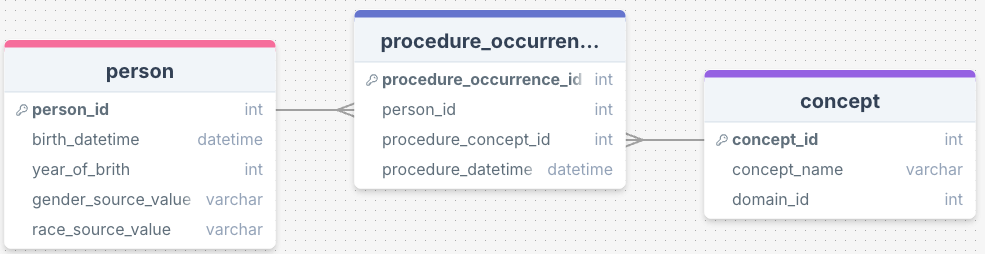
Joining tables require understanding the relationship between tables in a database. This is often visualized via an entity-relationship diagram:
Each rectangle represent a table, and within each table are the columns (fields). I am only showing a subset of the columns based on what we have explored so far in class. The connecting lines shows that there are shared values between tables in those columns, which helps one navigate between tables:
In the person table, the elements of the column person_id overlaps with the elements of person_id column in in the table procedure_occurrence.
In the procedure_occurrence table, the elements of the column procedure_concept_id overlaps with the elements of concept_id column in the table concepts.
We should consider to what degree the values overlap:
For each person_id in the person table, there may be duplicated person_ids in procedure_occurrence table, as a patient can have multiple procedures. This is a one-to-many relationship.
Multiple elements of procedure_concept_id in the procedure_occurrence table may correspond to a single element of concept_id in the “concept” table. This is a many-to-one relationship.
You can also have a one-to-one relationship.
The database we’ve been using has been rigorously modeled using a data model called OMOP CDM (Common Data Model). OMOP is short for Observational Medical Outcomes Partnership, and it is designed to be a database format that standardizes data from systems into a format that can be combined with other systems to compare health outcomes across organizations. The full OMOP entity relationship diagram can be found here.
Now, let’s join some tables.
3.4JOIN
We use the JOIN clause when we want to combine information from two tables. Here we are going to combine information from two tables: person and procedure_occurrence.
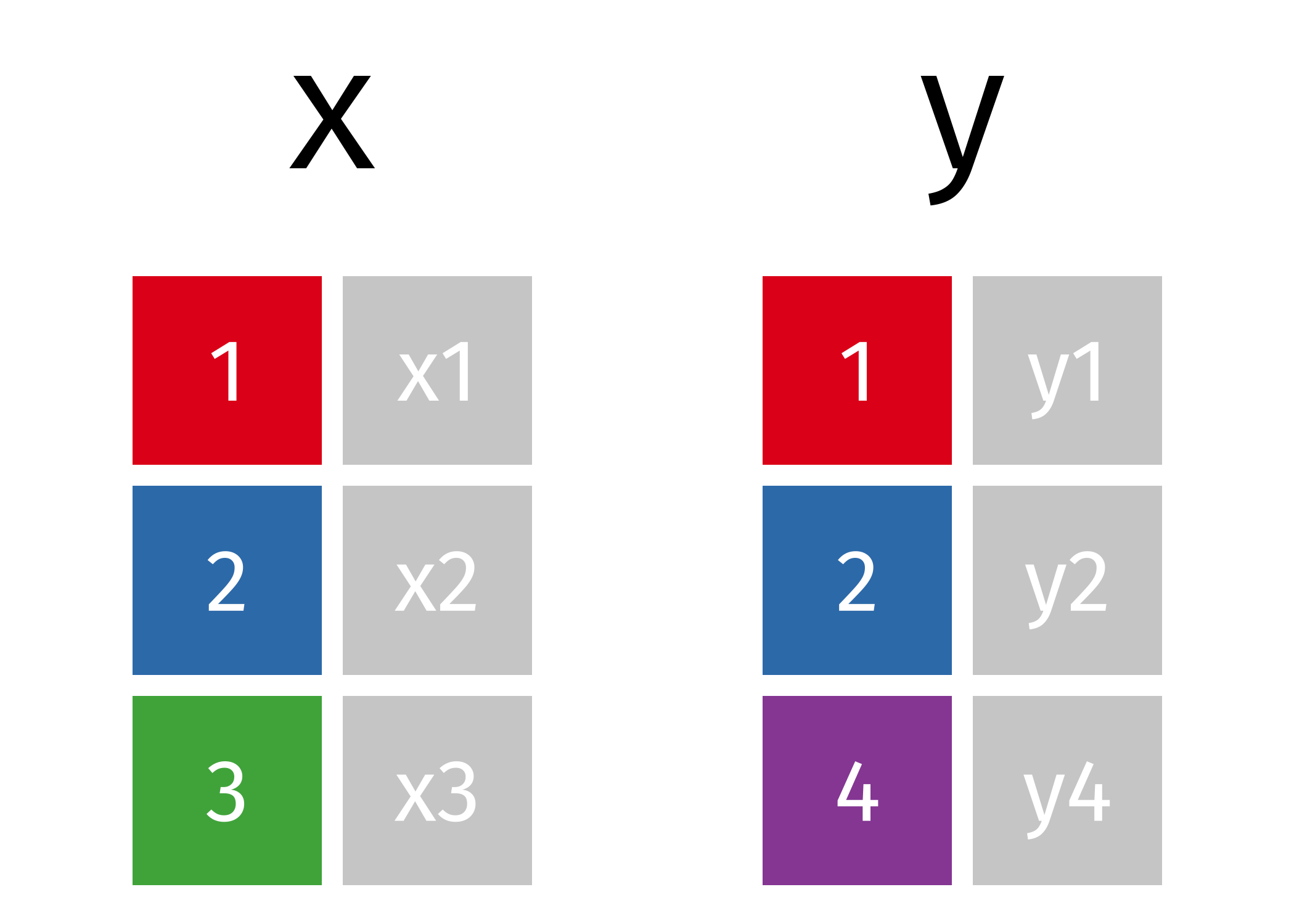
To set the stage, let’s show two tables, x and y. We want to join them by the keys, which are represented by colored boxes in both of the tables.
Note that table x has a key (“3”) that isn’t in table y, and that table y has a key (“4”) that isn’t in table x.
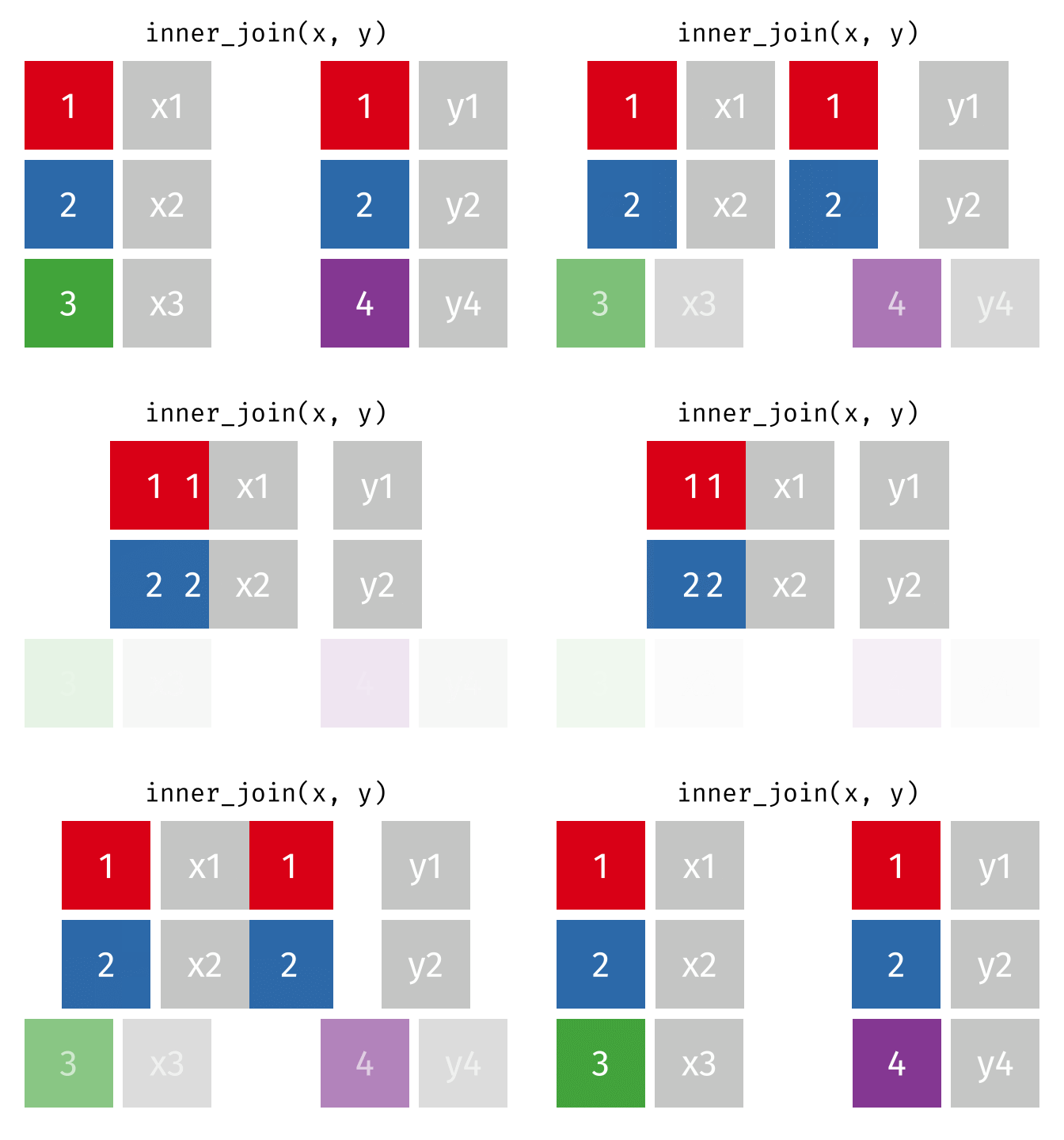
We are going to explore INNER JOIN first. In an INNER JOIN, we pick out a column from each table in which its elements are going to be matched. In this case, we only retain rows that have elements that exist in both the x and y tables. We drop all rows that don’t have matches in both tables.
There are other types of joins when we want to retain information from the x table or the y table, or both.
3.5INNER JOIN syntax
Here’s an example where we are joining person with procedure_occurrence:
SELECT person.person_id, procedure_occurrence.procedure_occurrence_id FROM personINNERJOIN procedure_occurrenceON person.person_id = procedure_occurrence.person_id
Displaying records 1 - 10
person_id
procedure_occurrence_id
343
3554
357
3741
399
3928
406
4115
411
4302
430
4489
442
4676
453
4863
469
5050
488
5237
What’s going on here? The magic happens with this clause, which we use to specify the two tables we need to join.
FROM person
  INNER JOIN procedure_occurrence
The last thing to note is the ON statement. These are the conditions by which we merge rows. We are taking one column in person, the person_id, and matching the rows up with those rows in procedure_occurrence’s own person_id column:
ON person.person_id = procedure_occurrence.person_id
3.6 Aliases
As your queries get more complex, and as you involve more and more tables, you will need to use aliases. I think of them like “nicknames” - they can save you a lot of typing.
Here is the same query using aliases. We use p as an alias for person and po as an alias for procedure_occurrence. You can see it is a little more compact.
SELECT p.person_id, po.procedure_occurrence_id FROM person AS pINNERJOIN procedure_occurrence AS poON p.person_id = po.person_id
Displaying records 1 - 10
person_id
procedure_occurrence_id
343
3554
357
3741
399
3928
406
4115
411
4302
430
4489
442
4676
453
4863
469
5050
488
5237
3.6.1 Another example
Here, I use table aliasing in two different places: in my COUNT, and in my WHERE:
SELECTCOUNT(p.person_id)FROM person AS pWHERE p.year_of_birth <2000;
1 records
count(p.person_id)
2694
Some people don’t use AS, just putting the aliases next to the original name:
SELECTCOUNT(p.person_id)FROM person pWHERE p.year_of_birth <2000;
1 records
count(p.person_id)
2694
We can also rename variables using AS:
SELECTCOUNT(person_id) AS person_countFROM person WHERE year_of_birth <2000;
1 records
person_count
2694
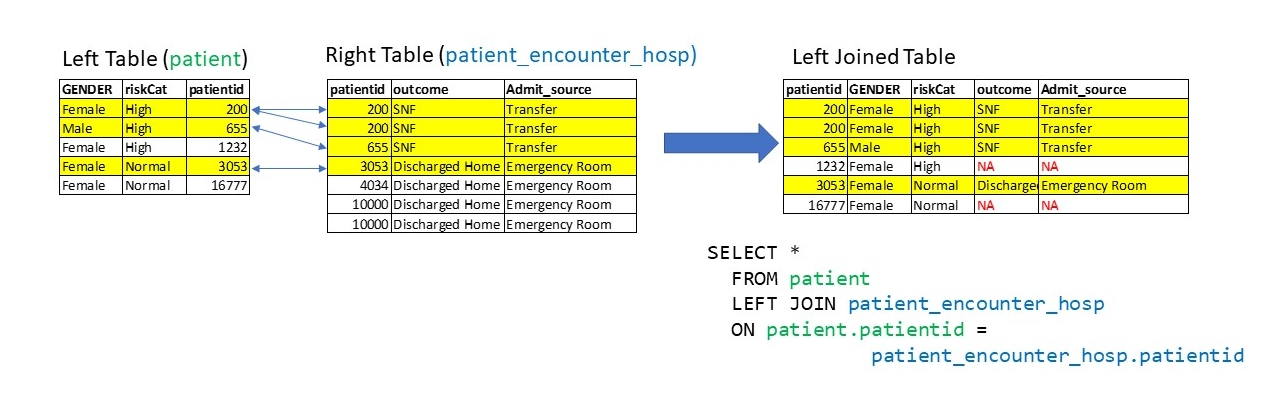
3.7LEFT JOIN
Jargon alert: The table to the left of the JOIN clause is called the left table, and the table to the right of the JOIN clause is known as the right table. This will become more important as we explore the different join types.
FROM procedure_occurrence INNER JOIN concept
      ^^Left Table                    ^^Right Table
What if we want to retain all of the rows in the procedure_occurrence table, even if there are no matches in the concept table? We can use a LEFT JOIN to do that.
If a row exists in the left table, but not the right table, it will be replicated in the joined table, but have rows with NULL columns from the right table.
Here is another example:
We can see the difference between a INNER JOIN and LEFT JOIN by counting the number of rows kept after joining:
SELECTCOUNT (*)FROM person as pINNERJOIN procedure_occurrence as poON p.person_id = po.person_id
1 records
count_star()
37409
SELECTCOUNT (*)FROM person as pLEFTJOIN procedure_occurrence as poON p.person_id = po.person_id
1 records
count_star()
37510
This suggests that there are some unique person_ids in person table not found in the person_id of procedure_occurrence table.
3.8 Other kinds of JOINs
The RIGHT JOIN is identical to LEFT JOIN, except that the rows preserved are from the right table.
The FULL JOIN retains all rows in both tables, regardless if there is a key match.
ANTI JOIN is helpful to find all of the keys that are in the left table, but not the right table
3.9 Multiple JOINs with Multiple Tables
Suppose that we want a table with person.person_id, procedure_occurrence.procedure_occurrence_id, and concept.concept_name. Looks like we need a triple join!
The way I think of these multi-table joins is to decompose them into two joins:
We first INNER JOINperson and procedure_occurrence, to produce an output table
We take this output table and INNER JOIN it with concept.
Some tips: Notice that both of these JOINs have separate ON statements. For the first join, we could have:
INNER JOIN procedure_occurrence AS po
  ON p.person_id = po.person_id
For the second JOIN, we could have:
INNER JOIN concept AS c
ON po.procedure_concept_id = c.concept_id
And that gives us the final table, which takes variables from all three tables.
One thing to keep in mind is that JOINs are not necessarily commutative; that is, the order of joins can matter. This is because we may drop or preserve rows depending on the JOIN.
For combining INNER JOINs, we are looking for the subset of keys that exist in each table, so join order doesn’t matter. But for combining LEFT JOINs and RIGHT JOINS, order can matter.
It’s really important to check intermediate output and make sure that you are retaining the rows that you need in the final output. For example, I’d try the first join first and see that it contains the rows that I need before adding the second join.
Here is the solution:
SELECT p.person_id, po.procedure_occurrence_id, c.concept_nameFROM person AS pINNERJOIN procedure_occurrence AS poON p.person_id = po.person_idINNERJOIN concept AS cON po.procedure_concept_id = c.concept_id
Displaying records 1 - 10
person_id
procedure_occurrence_id
concept_name
343
3554
Subcutaneous immunotherapy
357
3741
Subcutaneous immunotherapy
399
3928
Subcutaneous immunotherapy
406
4115
Subcutaneous immunotherapy
411
4302
Subcutaneous immunotherapy
430
4489
Plain X-ray of clavicle
442
4676
Subcutaneous immunotherapy
453
4863
Cognitive and behavioral therapy
469
5050
Cognitive and behavioral therapy
488
5237
Sputum examination
3.10 Using JOIN with WHERE
Where we really start to cook with gas is when we combine JOIN with WHERE. Let’s add an additional WHERE where we only want those rows that have the concept_name of ’Subcutaneous immunotherapy`:
SELECT p.person_id, po.procedure_occurrence_id, c.concept_nameFROM person AS pINNERJOIN procedure_occurrence AS poON p.person_id = po.person_idINNERJOIN concept AS cON po.procedure_concept_id = c.concept_idWHERE c.concept_name ='Subcutaneous immunotherapy';
Displaying records 1 - 10
person_id
procedure_occurrence_id
concept_name
16
289
Subcutaneous immunotherapy
180
1958
Subcutaneous immunotherapy
9
187
Subcutaneous immunotherapy
5
119
Subcutaneous immunotherapy
36
559
Subcutaneous immunotherapy
124
1226
Subcutaneous immunotherapy
225
2244
Subcutaneous immunotherapy
409
4243
Subcutaneous immunotherapy
236
2392
Subcutaneous immunotherapy
260
2556
Subcutaneous immunotherapy
Or keeping rows where the year of birth is before 1980:
SELECT p.person_id, p.year_of_birth, po.procedure_occurrence_id, c.concept_nameFROM person AS pINNERJOIN procedure_occurrence AS poON p.person_id = po.person_idINNERJOIN concept AS cON po.procedure_concept_id = c.concept_idWHERE p.year_of_birth <1980;
Displaying records 1 - 10
person_id
year_of_birth
procedure_occurrence_id
concept_name
343
1970
3554
Subcutaneous immunotherapy
357
1954
3741
Subcutaneous immunotherapy
399
1955
3928
Subcutaneous immunotherapy
406
1952
4115
Subcutaneous immunotherapy
411
1959
4302
Subcutaneous immunotherapy
430
1931
4489
Plain X-ray of clavicle
442
1947
4676
Subcutaneous immunotherapy
453
1970
4863
Cognitive and behavioral therapy
469
1935
5050
Cognitive and behavioral therapy
488
1954
5237
Sputum examination
3.11WHERE vs ON
You will see variations of SQL statements that eliminate JOIN and ON entirely, putting everything in WHERE:
SELECT po.person_id, c.concept_name FROM procedure_occurrence as po, concept as cWHERE c.concept_name ='Subcutaneous immunotherapy'AND po.procedure_concept_id = c.concept_idLIMIT10;
Displaying records 1 - 10
person_id
concept_name
343
Subcutaneous immunotherapy
357
Subcutaneous immunotherapy
399
Subcutaneous immunotherapy
406
Subcutaneous immunotherapy
411
Subcutaneous immunotherapy
442
Subcutaneous immunotherapy
499
Subcutaneous immunotherapy
533
Subcutaneous immunotherapy
563
Subcutaneous immunotherapy
680
Subcutaneous immunotherapy
I’m not the biggest fan of this, because it is often not clear what is a filtering clause and what is a joining clause, so I prefer to use JOIN/ON with a WHERE.
3.12 Revisiting WHERE: AND versus OR
Revisiting WHERE, we can combine conditions with AND or OR.
AND is always going to be more restrictive than OR, because our rows must meet two conditions.
ORDER BY lets us sort tables by one or more columns:
SELECT p.person_id, po.procedure_occurrence_id, po.procedure_dateFROM person as pINNERJOIN procedure_occurrence as poON p.person_id = po.person_idORDERBY p.person_id;
Displaying records 1 - 10
person_id
procedure_occurrence_id
procedure_date
1
1
1981-08-17
1
2
1982-09-11
1
3
1981-08-10
1
4
1958-03-11
1
5
1958-03-11
2
6
1955-10-22
2
7
1977-04-08
2
8
1931-09-03
2
9
2007-09-04
2
10
1924-01-12
Once we sorted by person_id, we see that for every unique person_id, there can be multiple procedures! This suggests that there is a one-to-many relationship between person and procedure_occurrence tables.
3.14 Try it Out
We can ORDER BY multiple columns at once. Try ordering by p.person_id and po.procedure_date:
SELECT p.person_id, po.procedure_occurrence_id, po.procedure_dateFROM person as pINNERJOIN procedure_occurrence as poON p.person_id = po.person_idORDERBY----, ----
3.15 Constraints and rules for Databases
So far, we’ve only queried data, but not added data to databases.
As we’ve stated before, DuckDB is an Analytical database, not a Transactional one. That means it prioritizes reading from data tables rather than inserting into them. Transactional databases, on the other hand, can handle multiple inserts from multiple users at once. They are made for concurrent transactions.
We are not going to look at how to add to a database in this course, but we are going to examine what the constraints can be placed on a database, because this gives rules on what is allowed in our database to be queried.
When one sets up a database, we also set up the constraints via a Data Definition Language for our tables:
We’ve encountered one constraint: database fields (columns) need to be typed. For example, id keys are usually INTEGER. Names are often VARCHAR.
Here are some other constraints that can be applied to a field (column):
NOT NULL - no values can have a NULL value.
UNIQUE - all values must be unique.
PRIMARY KEY - NOT NULL and UNIQUE.
FOREIGN KEY - value must exist as a primary key in another table’s field. The referenced table’s field must be specified.
CHECK - check the data type and conditions. One example would be our data shouldn’t be before 1900.
DEFAULT - default values are given if not provided.
The most important constraints to know about are PRIMARY KEY and FOREIGN KEY. A PRIMARY KEY is required for any table, and cannot be NULL and must be unique. This gives an unique id for each entry of the table.
When we create tables in our database, we need to specify which column is a PRIMARY KEY:
CREATETABLE person ( person_id INTEGERPRIMARYKEY)
FOREIGN KEY involves two or more tables. If a column is declared a FOREIGN KEY, then that key value must exist in a REFERENCES table as a primary key. Here, when we create procedure_occurrence, person_id column REFERENCES the table person’s person_id primay key column, and procedure_concept_id column REFERENCES the table concept’s concept_id primary key column.
 There are other types of joins when we want to retain information from the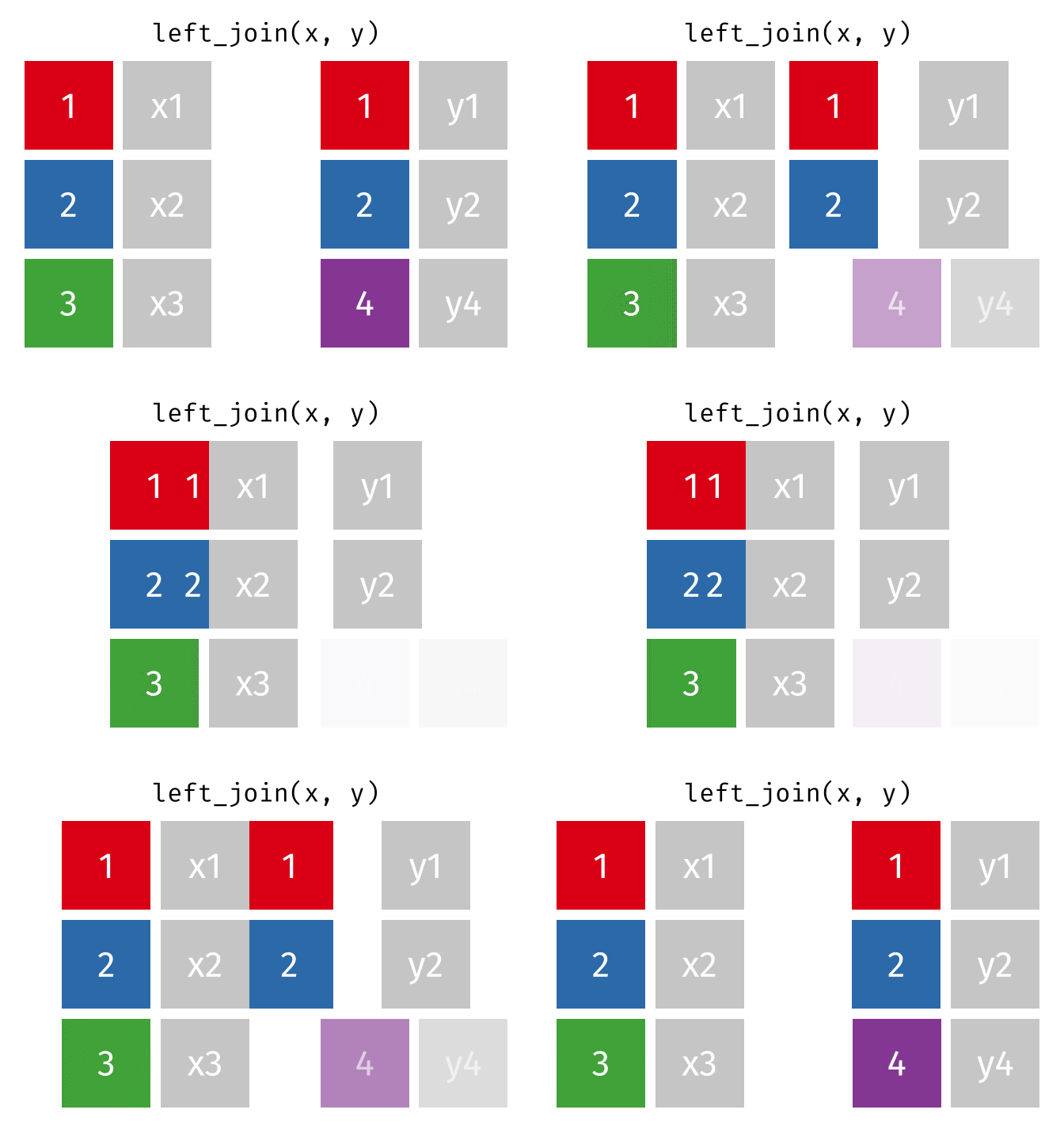
 We can see the difference between a